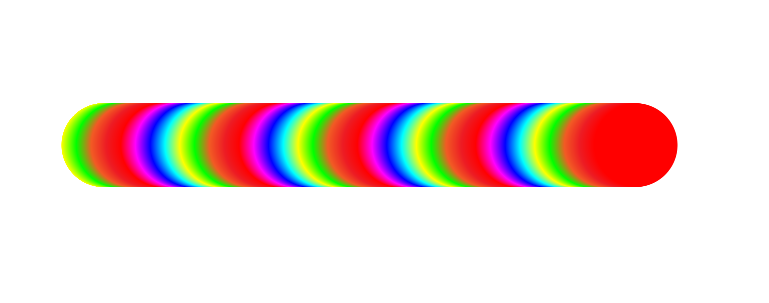
This piece was created using the SwatchCycle script, which automatically applies selected swatches to artwork in sequence. By cycling through a rainbow palette across repeated shapes, it creates a smooth, flowing color transition without using gradients or blends.
It automatically applies selected swatches to selected artwork in sequence, saving time compared to manually assigning colors. It cycles through the active swatches panel and assigns each color to objects or text in order, with an optional random mode for more varied results.
What I love about this approach is how simple and flexible it is you can experiment with colors instantly, swap palettes in seconds, and let the design evolve naturally. It’s a great reminder that sometimes beautiful results come from smart tools and small creative experiments, not complex effects.
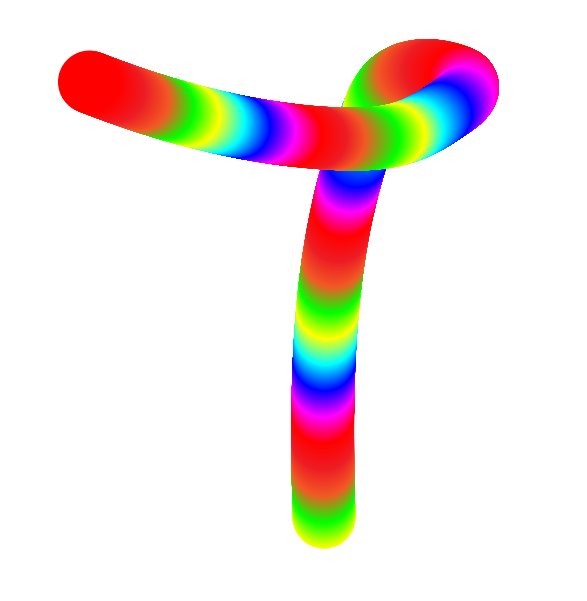
After applying colors with SwatchCycle, you can take it a step further by turning the artwork into a custom brush and replacing the spine. This allows the same palette-driven color flow to follow any path curves, bends, or even hand-drawn strokes while keeping the color rhythm intact.
This piece shows how a simple swatch cycle can transform into something more expressive. What starts as flat, repeated colors becomes a flexible, flowing form that feels almost painted. It’s a great way to explore color, movement, and form in Illustrator fast, playful, and full of creative possibilities.
What it’s used for
- Quickly colorizing icons, illustrations, patterns, and UI elements
- Creating rainbow or palette-based typography without manual editing
- Testing different color palettes across complex artwork
- Speeding up workflows for designers who frequently experiment with colors SwatchCycle
Productivity tool for designers who want fast, consistent, and flexible color application directly from their swatches.
